2017-10-09T18:11:35
Rated 5 out of 5
Simply just works
Have this computer for 10 years and it always worked flawlessly. Changed batteries and updated firmware just to keep up. With heart monitor it lets me stay under longer since it is calculating RBT more precise.
BORIS V.
2017-10-03T14:33:51
Rated 3 out of 5
Fantastic computer thats hard to see
I owned this computer for over 18 months and dived over 60 dives with it.
First the good. It has all the info you could ever want and you can configure the screen to show a little or a lot. Has the best compass in the industry too. Great software for windows and ok software for a mac. I use a mac and needed to buy an irda adaptor for it but you don't need the expensive one from Scuba Pro. Just pick one up online from a company called GEARMO. Cheap and works perfect.
After 62 dives the battery still shows full, so it lasts a long time. However they cost 14 bucks so it should.
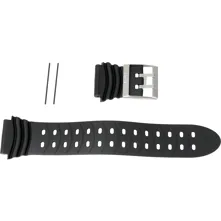
Now for the ugly: Not a fan of the strap. Not much stretch too it so unless you really cinch it down tight its loose at depth. Also there isn't any slots for bungee cord if it breaks.
The fatal flaw is its unreadability. 3 issues about this.
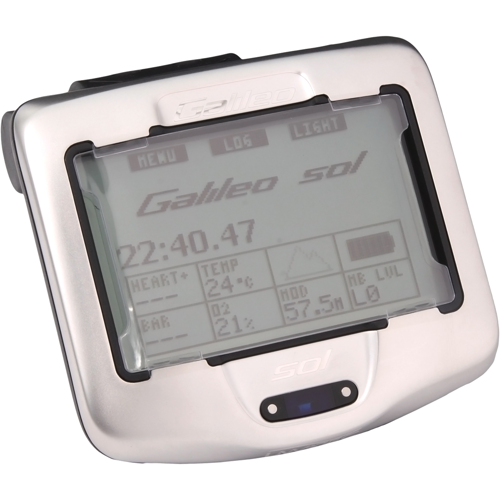
First after the dive you can't read the screen very well because of the plastic screen guard. Water droplets collect under it that you can't wipe away making it difficult to read. So what was my max depth the captain asked? Get ready to lie or remember it before you surface.
2nd: Hard to see in low light. Day dive in the tropics...no problem. Murky dive to 80' in the Pacific and it's hard too impossible to see. Back light you say? WORTHLESS. It's so dim it doesn't help. I'd rather buy more batteries and have a light that works.
3rd: Night dive...Forget it! the only way to see this computer is with your dive light. Pain in the rear to watch your accent rate and safety stop while holding your flashlight on it.
So even though I enjoyed all the yummy info this computer generated for me I had to let it go (at a steep discount mind you). I recommend getting the newer version with the better screen but with a non-user replaceable rechargeable battery or the other top of the line computer that uses anything from a AA to a rechargeable that you can swap out yourself. There's better choices.
Mark R.
2017-03-23T03:33:41
Rated 5 out of 5
Only on falt, it was ahead of its time, now... may just be my eyes
I bought one of the original first editions like around 2009, it was way ahead of its time and i loved it and still diving and will continue to dive with this and would replace it with the same, so unless you are going full on tech diving. best on market... only fault is is I wish they got better back lighting.. maybe just my eyes.
All the other knock-offs look pretty with the colored displays (which i can understand importance for true tech diving...)
only real problem.. going to virgin islands and wanted to take my on reg at least.. but wrist band broke... think my nephew. had some to do with it.
Watch the video yes... but go to your friendly dive shop where you go and loiter at, bring them a gift care for dinner somewhere and have them do all the initial set up. i got mine before they had those, he taught me everything i needed in abut 20 mins.
Or if you are good- spear those lion fish - if you are not eating them yet... best eating out there... lets eat them to death and reclaim the reefs.
JOHN J.
2013-06-19T20:00:00
Rated 5 out of 5
Very good addition
As always Leisurepro delivered faster than any other dive shop I have purchased from. Great packaging and every ítem in its original box.
Just M.
2013-01-04T19:00:00
Rated 5 out of 5
all information available when needed
A computer that will give you the most bottom time with confidence and security of returning safely to the surface. The infared computer log is a great addition to view your dive pattern and progress through out your dives.
Keith
2012-11-03T20:00:00
Rated 5 out of 5
An update on my 2009 review.
I am still in love with this computer. There are others that have copied the features of this computer and it is starting to be dated by its mono-color display, though it is still very usable and easy to read, I think a little color in the right places could make the unit easier to understand. I have made over 100 dives on my Del Sol. I am getting ready to change my battery in the computer for the third time (I do not let it run all the way down, as soon as it says the battery is low I change it). The battery is easy to change and can be bought over the internet for about $12US.
I have just recently updated the firmware with the latest upgrade which includes TRI MIX. The update allows the use of up to ten tanks in any order. This solved my problem that I had when using a mix in my primary tank and air in my pony system. You need to make sure you have the right tank selected while diving or you could run into problems so double check everything before and during the dive.
Schuedog
2011-12-23T19:00:00
Rated 5 out of 5
I love my SOL
Leisure Pro's service and delivery has always been top notch. Even with standard shipping I've always received my orders in 2-3 days. They get everything shipped promptly and it always arrives in pristine condition. The few items I have had that have been on back order, I have always received updates on their status and on at least 1 occasion, was shipped directly from the manufacturer to expedite the process. The customer service has been extremely helpful in chosing equipment and determining sizes and they have always provided good accurate product information.
slyfox
2010-12-19T19:00:00
Rated 5 out of 5
Excellent product
The on-line course timed out before it should have
hikerdiver
2009-09-21T20:00:00
Rated 5 out of 5
Highly recomended
After using many other computers over the last 15 years, I have finally found one device that does everything I need it to do.
ONCE you have read the operators manual and tried out the functions you have availible, you wont look back.
The unit is large but fits comfortably on your forearm, all info required is easy to read.
The best investment I have made in years
Jase
2009-04-25T20:00:00
Rated 2 out of 5
BEWARE, you also need to buy attachments
First off I was to say that I think this is the BEST computer on the market, however, once you buy this computer you will soon learn the following:
1. There is a large manual you will have to understand along with a number of memus you will have to be familiar with...at 56 I guess I am not as smart as I once was.
2. You will soon discover that you will have to buy the Smart Infrared Devise and CD program disk so your dive computer can talk with your PC !! One would think for as much money as this dive computer cost the company would throw in the cord/disk as part of the package....
MaleRN D.
2009-04-02T20:00:00
Rated 5 out of 5
Well worth the extra cash. A must have!
I bought the Galileo Sol last year and I have made about 20 dives with it so far. I have dove everything from black water to crystal clear Caribbean water, ice to tropical. I have yet to find a situation where I was sorry I spent the money. I have dove every configuration with this computer and I recommend using the Classic display. It offers all the information you will need. You can switch between the displays while using the computer so if you need more information you can get it from the Classic.
The unit is a little on the large size but as you add features and items displayed the unit has to be larger. I would not want this particular unit to be any smaller. I dive with a dry suit a lot and the strap fits around the suit above the wrist ring perfectly. I admit that while diving in warm water I have to tuck the strap in behind the unit(it has a slot where you can tuck the tail in).
The entire computer software and display information can be upgraded and changed by Uwatec via a downloadable patch. This means that it should never again become obsolete as long as Uwatec supports it. Feasibly they could offer other software upgrades so that the computer would support other gas mixtures. I do not know if they have entertained this idea or not.
Cons: No real cons only slight inconveniences.
I dive with a second redundant air source system. I bought a second transmitter for it. The only complaint is that you have to have the same or less oxygen percentage in the third tank (T3) and the second tank (T2) than in the main tank (TD). This is fine when I am using two large tanks but when in the tropical and only using a pony I have to switch my transmitters so I can dive with the Nitrox in my main tank and air in my pony. A fix that they could address but have yet to do so.
Beware when yo buy an IRDA transceiver that it is Vista compatible so that if you use Vista or upgrade computers it will still work.
Schuedog
2009-02-02T19:00:00
Rated 4 out of 5
~ Great Computer ~
This is a great computer. I like the digital compass feature, even though it took some getting used to. This computer is a little bulky, and has so many features ~ making it not the most user friendly. It has taken some time to get used to it, but has been well worth it. A little over priced, but shop around... It is worth it in the long run.
JASON R.
2009-01-28T19:00:00
Rated 5 out of 5
No question, the best dive computer ever
There are many excellent reviews here and I shall just emphasize a few points as well as address some of the "cons".
The software that comes with the computer is fantastic. Not only does it fill in the basics, it allows you to completely describe the sea and surface conditions, your buddies, your equipment, your dive site, the fish you saw, etc. You can even insert pictures of your buddies, the dive sites, wrecks and you can make detailed notes about every portion of your dive.
You can review your heart rate, and air consumption on a moment to moment basis and bookmarks that you make during the dive can be annotated. You can add in other marks and annotate them as well after the dive. The actual face of your computer is replicated in the upper right hand corner of the dive graph screen. You can sweep the status bar through your dive and review what your computer face was showing at the time. If you don't have an infrared port on your computer, you can buy a generic one for about $23 that works just as well as the UWATEC $70 one.
I have an alternate air source on my power inflator. This means that my recreation regulator has only 2 hoses, my primary 2nd stage and the inflator hose. This certainly simplifies hookup and means 2 less hoses to hassle with.
The electronic compass is fantastic. I will never willingly use a standard magnetic compass again. You can tilt it up to 45' with little of no loss of accuracy. 90', 120' and 180'" hashmarks are automatically displayed. Want to set the reciprocal? Turn you compass until the parallel lines are in front of you and then press the set button again. When navigating, you get easy to read, swim left and swim right arrows to keep you on course.
Now let me address a few of the "cons"
---------------------
"Hard to read the tank pressure and other vital readouts."
Well you can always set the display for LIGHT which will give you tank pressure Depth, dive time and no deco time in huge numbers. I personally like the "CLASSIC with grid display. You just have to know where the data is on the screen.
--------------------
"The wrist unit is too big and the strap is too long and hard to control."
Well gee whiz, I'm old and a big screen means I can see the numbers easier underwater.
As for the length of the extra wrist strap, I don't mind having a few inches of strap hanging free, but if I did 2 snips with a pair of large scissors would fix things forever.
______________________
"Complicated"...well duh. It's an advanced, highly customizable piece of electronics. While the basic functions are straight forward to get everything out of it...YOU MUST READ THE MANUAL COVER TO COVER PRIOR TO USING THE COMPUTER. You wouldn't expect to be able to use your new database program effectively without the manual, the same goes for the Galileo SOL. The same goes for the SmarTRAK softhearted
_______________________________
"Expensive" OK, well. yeah got me there
------------------------------
"Too complicated an too much information for me to assimilate"...
Buy a cheap wrist mounted computer.
___________________________
SCOTT M.
2009-01-17T19:00:00
Rated 5 out of 5
Fantastic computer
This is the best computer I have ever seen and certainly used. Best purchase I have ever made in dive gear.
I have used gauges, the Cobra II and others before getting the Galileo, and I will tell you honestly, this is the last computer you will ever want to buy or use.
It not only does everything, it is easy to use and very convenient.
Many of the other computers I have used always had a flaw of some kind that left me searching for the ultimate device. For example: the Cobra II is a good computer and reliable, but like gauges, it attaches by hose to a tank and then is connected to a lanyard or put into a pocket to keep it from dangling. When you need to read your gauges, you must reach for it an pull it up, utilizing a hand, which may be needed for other tasks. This can be a critical element when you need to read your computer while ascending and hanging onto a line or a camera or other equipment.
The Galileo gives you all the important information you need to monitor in a very readable format readily available on your wrist where you can see it constantly and leave both your hands free. If you use a camera, descend to wrecks on ropes, ascend using a marker buoy, enter wrecks under limited visibility, night dive with torches or just need both hands, the Galileo is for you. You are hands free to perform other critical tasks other than grabbing your computer to see your air status or ascent rate, thanks to the wrist mount design with a transmitter connected to your first stage on the tank. The heart monitor feature adds that extra bit of information that helps the computer track air use and time remaining. A built in compass is easy to use and read.
I have no complaints, only praise for this computer. I went on an 8-day diving trip in the Similan Islands in the Andaman Sea off Thailand recently and it was voted best computer on the live aboard boat by all the other divers.
One word of caution or advice; the computer comes with a plastic film on the clear plastic face cover. Leave the film on until it gets marked up enough to change. Otherwise you risk getting the actual face cover marked up by incidents abrasions. The computer kit comes with a replacement film to for use when it gets too scratchy to read through. Keep in mind the film is there to help keep your computer in top shape longer, so don't remove it till you have to.
Another tip is to put the computer on your right wrist so you can monitor your ascent and air while using your left hand to control your BCD inflator.
Stop looking around and buy this computer. You get what you pay for. This computer is worth every penny.
Scott
2008-12-26T19:00:00
Rated 5 out of 5
Incomparable Computer, READ THE MANUAL!!
This dive computer has something for everyone if you can afford the steep price. The number, scope and flexibility of the functions is breathtaking.
You can configure the display to show you the most essential data, everything or an intermediate amount depending on your needs (and eyesight.) You can even invert the display if you want the buttons on the bottom.
The number, type and urgency of the alarms are all adjustable. You can mark an event during your dive with a bookmark that will show up on your electronic log that you can annotate with specific information later. (ie I saw a reef shark, I want to bring Sally back to see this wall next week)
Once you use the digital compass you'll never want to go back to a standard compass again. It made the NAV section of my Advanced Open Water a breeze. You can store maps on the unit that you can call up during the dive. You can also store personal info to include emergency data such as next of kin, Blood type, Medical insurance and DAN policy numbers that EMS units can access w/o problem.
The SmarTrak software electronic logbook allows you to examine your air consumption, heart rate and the actual display of your dive computer at any point in the dive. You can set the transfer (done via the IR port on your PC) to reject any dives less than a certain depth, thus keeping pool dives off your log.
I could go on for a while but this brings up the one "con" of this computer. You must read the manual for it and for the SmarTrak software from cover to cover and set the entire thing up prior to your first dive. Granted their are a few items that you can only set up once you get in dive mode. (deeper than 3 feet/1 meter) and you'll probably end up changing some of the settings once you use the unit but reading everything and setting up as much as you can beforehand will make your first few dives a lot more enjoyable.
UWATEC even supplies a sample logbook when you load SmarTrak so you can play with the table and graphic display modes of the software prior to loading in your dives. I got to do decompression dives in the Red Sea w/o even getting wet...how cool is that.
SCOTT M.
2008-12-26T19:00:00
Rated 4 out of 5
Wonderful, but very large
I love how easy it is to switch from air to Nitrox, that was the main reason I bought this computer. All other computers require Engineering Degrees to switch between 02 and Enriched Air. This computer is soooo easy!
My only complaint is that it truly is too big for a female diver (or petite man's) wrist. The strap doesn't fit well, no matter how I've worked with it. Wish they'd make a smaller version!!!
Aloha D.
2008-12-19T19:00:00
Rated 5 out of 5
Nothing Else Compares! The Ultimate!
It does everything it claims and then some. And it's even better with the new PDIS software update. People say this CPU is too big, I can't disagree more, I struggled to see my Aeris wrist (watch) dive CPU in anything but the best conditions and it was a large wrist model. The digital compass is worth several hundred dollars alone as it works at any angle. If you can afford it buy it!
CLAUS B.
2008-12-05T19:00:00
Rated 4 out of 5
Great Computer, bad update
Great Product, does exactly what i wanted it to do but as for the software updates...mine didnt work after i updated and is still in for repair. Fingers crossed its fixable.
Diver s.
2008-11-17T19:00:00
Rated 4 out of 5
Really nice dive computer
This dive computer really was designed to do everything, and it has a lot of functions. I use it for recreational Scuba, but I'm starting to take advanced and tech classes, and the Galileo Sol is perfectly suited for that as well.
The best feature is the wireless/hoseless design. With a rather unobtrusive transmitter, you can eliminate an SPG hose. Also, if you buy extra wireless transmitters, you can use the computer with up to three air tanks, PLUS monitor your buddy's pressure. It's Nitrox compatible, too.
The deco algorithm makes sense... and you have five additional levels of conservatism if you want to go that way. The battery is user-replacable, but it is extremely hard to find the battery type that the Galileo Sol takes. It would be more useful if the computer used easy-to-find CR123A batteries or some other more common type.
My biggest gripe about it is the layout. The most important pieces of information are your tank pressure and your depth. But the layout puts your tank pressure in really small numbers at the bottom. This could be fixed with a software update... crossing fingers. For an example of how a layout should be done, see the Sherwood Wisdom 2.
Another gripe is something that I've never experienced, and hope I never do. The computer will lock up if you exceed deco limits. Uwatec, please change this with a future update!
Seth
2008-07-27T20:00:00
Rated 5 out of 5
No way to compare with anything else
Cadillac of all computers with all possible features, programable for future concern, can change the tissues.
Tomcat
2007-11-08T19:00:00
Rated 5 out of 5
Really is the ultimate dive computer
After 5 months of diving with the Galileo Sol, I am totally convinced about its capabilities.
The screen is so large and readable and the displayed messages are so simple and clear that you can see at-a-glance your exact status for both gas and decompression.
There are so many features that have proved useful (e.g. customisable display messages, any-angle compass) that I wont describe them all here. But, because of all the options, you need to spend some time with the manual to understand all the benefits.
If you can afford it, buy it.
Peter