2016-01-02T13:15:07
Rated 3 out of 5
Average quality with a poorly designed writstband
I've done three dives with this computer, so my experience is limited. I have not had issues with losing the sensor to the air gauge, so this is not a problem. It is generally an intuitive watch. The manual is quite confusing. It was extremely difficult to figure out how to set it up for Nitrox. I have not dove with Nitrox yet, so I am not even sure that I have figured it out. There are several different Gas settings and the manual does a poor job of explaining how they work.
Without question, the dumbest part of this watch is the wristband. It is really long and, for some unfathomable reason, it is designed so that you cannot shorten it or loop it around without cutting it. I ended up cutting off the end, but even with that it still hangs out awkwardly. I really can't figure out how anyone Oceanic thought this was a good idea.
DOUG D.
2015-06-13T20:00:00
Rated 4 out of 5
Have a backup system
PROS: I like the fact that you have so many features that can be customized, and the display is easy to read. The computer allows multiple mixes on a dive, which is handy. There is a "deep stop" function, and a compass. You can choose which algorithm to use.
CONS: I periodically have problems with the computer losing signal during a dive. The compass is slow and difficult to use. The compass also frequently needs to calibrate itself, which requires the user to spin the computer for several minutes. For this reason, I cannot recommend that you use the built in compass as your primary compass.
The menus and buttons can be a bit confusing, with so many settings, it is easy to get lost in them.
I also had the computer fail on a dive. 8 minutes into my second dive of the day, the screen went blank and wouldn't respond at all. My first dive of the day was to a max depth of 63 feet for 35 minutes, and this dive was to 56 feet. Both dives were being done on EANx32, with the computer set for air, so DCS was not an issue. Not knowing how much as I had DID concern me. Changing the batteries once we were on the surface did not fix the computer. There was no sign of flooding. The computer had only been on about 50 dives. I sent it in to the factory (under warranty), they repaired and returned it.
This was a MAJOR safety issue, and I am glad that this failure did not happen under more extreme conditions. Lesson learned. I now wear a backup computer strapped to my BC, and I have an SPG attached to my reg.
Ernie
2015-03-29T20:00:00
Rated 5 out of 5
Good Computer
Works great. Does everything I could imagine. No problem loosing contact with sensor. Still learning some features etc. But all in all great computer for me.
bigfishy
2013-08-22T20:00:00
Rated 4 out of 5
VT 4.1 vs Atom 3
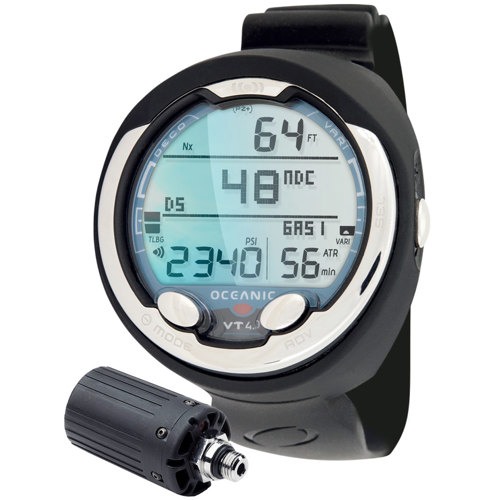
I purchased the VT4.1 because it had all the features I wanted and had a lot of good reviews. However I returned it and got an ATOM 3. The watch is a great watch, but it was a lot bigger than I thought it was going to be. My son has the Atom 3 and looking at the pictures on line I didn't think it was going to be that much bigger, but it was significantly larger. This would be good for us older guys that didn't eat enough carrots, but the font size on the VT was only a little bigger that the Atom. I probably still would have stayed with the VT except the buttons were much harder to push than my son's Atom 3. So I decided to send the VT 4.1 back and get the Atom 3. Now the only problem is keeping track of which Atom 3 is mine and which is my sons.
My son uses the Atom as a dive watch and an everyday watch. He is very happy with it. I highly recommend it also but have two complaints:
1. The alarm just is not loud enough. I can actually hear my son's alarm louder than I can my own so there is probably something wrong with mine.
2. I wish Oceanic would bring back the buddy check. We both have the wireless remote that works great and it would really be nice to see my son's air pressure on my watch. I know it has limited range and you would need to be close to register the pressure. But I would find that a lot better than having to try and get the pressure from him.
Tre
2013-08-14T20:00:00
Rated 4 out of 5
Oceanic VT4.1
LeisurePro continues to amaze me with their customer service. There was an error on the website that showed me one price, but jumped significantly higher when going to checkout. Not only did they honor the price, but the product arrived the very next day.
Scubatim81
2013-08-08T20:00:00
Rated 5 out of 5
Oceanic vt4
The best dive computer sums it up. Easy to operate is an understatement. It has loads of features and built in compass is a plus. I love it. Once you go air integrated you'll never go back.......
Trigger L.
2013-06-17T20:00:00
Rated 3 out of 5
Not Well Designed
Oceanic obviously cut some corners in making this product. I should know better than to think you get quality at a bargain.
The transmitter signal is incredibly weak. Despite the watch not alarming until it has lost signal for more than 15 seconds (I believe) this watch alarms at me every five to ten minutes. Over a 45-50 minute dive that is infuriating.
The internal electronic compass, which prompted me to buy this model, is terrible. To access it you have to press the select button for two seconds and then you have to wait three to five seconds for the reading to stabilize. This means you spend a lot of time staring at your watch during a dive; not what I pay all that money to do. If I don't return this computer I'm going to buy a wrist mounted traditional compass; I can't stand wasting all that time screwing around with my computer.
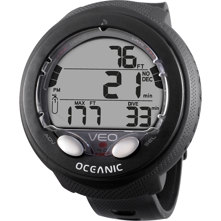
There is very little information on the "home" screen; only tank pressure, depth, no deco time remaining, air time remaining, and two bar graphs. To see the water temp and how long I've been down I have to press another button to get to another menu.
Bottom line is that I bought this watch to simplify my diving experience and it has done nothing but complicate it. I absolutely do not recommend this watch; save your money and buy a better model or stick with the traditional attached air gauge and wrist computer.
Cobradriver79
2013-06-15T20:00:00
Rated 5 out of 5
Improved Compass Function
I would like to add an clarification to my previous post. When I refer to ability to change compass heading on-the-fly while underwater, what I mean is that you can push one button A to go directly to to "change heading" or "reverse heading." Then three rapid pushes of the S button will complete the process. The fact that it is the same button that is repetitively pushed makes it very easy. With the OC-1, you had to go to compass mode, then with separate button go to compass menu, then scroll to set heading, then a three push process of the of the S button. It was too many steps to deal with underwater. Maybe that navigation issue has been improved on later OC-1? Mine is vintage 2010/
The assignable shortcut button (long push M) is operational at the surface, and saves all the steps of getting into compass mode, then compass menu, then set heading etc. You can assign set heading to the button, and it will go directly there.
John H.
2013-06-14T20:00:00
Rated 5 out of 5
Greatly Improved Compass Function
The numbers are much easier to read than with OC-1. The compass navigation is a quantum leap better than OC-1, in that you can change heading on the fly in compass mode. Even more significant is that you can choose or change heading WHILE IN DIVE MODE by assigning that function to the shortcut button. No more going back and forth to compass mode and then to compass menu etc. etc. to choose or change heading as with OC-1. The compass is now completely user-friendly. Like the fact I can use same transmitter at the same time for both Datamask and VT-4
John H.
2013-05-13T20:00:00
Rated 4 out of 5
Good computer, don't buy from LeisurePro
Delivery was quick, but did not include the computer download kit as advertised. LeisurePro said they don't have the USB cable, but would try to get one. That was a month ago and still no update. If the cable is backordered they should communicate that information. At this point I think they just don't care to fulfill the order.
John D.
2013-05-08T20:00:00
Rated 5 out of 5
excellent computer
I have been using an Atomic Cobalt. Lets face it you cant beat the simplicity of the cobalt and the very intuitive menu. The Cobalt however is a console. When diving with lots of gear and drysuit/drysuit gloves it is cumbersome to look for your console or know by feel what your actually grabbing to look at. Hence my Cobalt is clipped to my BC and Vt 4.1 is on my wrist with all the data I need at a glance. I do think it would benefit to have more contrast in dark murky water as I find myself checking my Cobalt in these situations. If however you are an 80/80/80 diver. 80 degrees surface temp, 80 degree water temp and 80 feet visibility than you will have no issues with this whatsoever. Much improved software layout from past Oceanic products.
Dr C.
2013-05-05T20:00:00
Rated 5 out of 5
Good Dive Computer
Have not used it yet. Plenty of training available.
addster
2013-01-23T19:00:00
Rated 5 out of 5
Excellent PDC at all levels
My wife and I purchased two Oceanic VT3 dive computers with transmitters recently (November 2012) and were delighted when Oceanic, in conjunction with LP, sent us two VT4.1's instead. We couldn't be any happier for numerous reasons and would have been just as happy with the VT3, but are overjoyed with the VT4.1. This is a great PDC and we chose the Oceanic brand based on its features, the many positive reviews, both here and in online forums, coupled with LP's incredible price, which was unbeatable for the quality and features for this type of wrist mounted computer.
We have used them for over 30 dives so far and in varying conditions -- deep and shallow; good ambient light to total darkness; from the Cayman's North Wall at 112+ ft to the semi-darkness of the Palancar Caves at 90ft. Under all conditions it worked flawlessly, was easy to read, switched screens efficiently and performed all functions easily and effortlessly from setting Nitrox mix to logging our dives. The transmitter worked perfectly, never shut off, as others have referred to, even though I had it mounted left side while I wore the PDC on my right wrist. We tested its transmission capability in shallow waters and it worked up to 10 feet way from the tank with no problem.
Although these are our first "owned" dive computers, we have used ones provided by good Dive Shops before and this Brand so exceeds both sister Aeris PDC's and Suunto, which was our other choice. The long sturdy strap fits very well, even for my wife, although we both understand that it is a one size fits all, it can be trimmed to your specific needs, just make sure you measure with and without a wet suit.
We are not "tech savvy" and we didn't find it particularly complicated to learn the VT4.1's operating system, although I strongly recommend completing the free online training course if you have never owned a PDC before. If you have, this one will be far easier to program than the other competitive ones we have looked at. Oceanic support is outstanding and I just called them to register the units instead of online just so I could see how responsive they were. It was excellent service and it was good to know that they stand behind all their products the same way LP does.
I don't have any significant issues except that the Oceanic firmware for logging dive is still a work in progress, so we purchased a third-party program which works very well with the VT4.1 using the included USB cable.
We are headed to Roatan in February and will check it our further, but as for now, I strongly recommend this product. Having done over four months of extensive research in real time application and online, I can honestly say there are few, if any equals for this unit at this price point.
P.S. Hats off to the great (and experienced) online sales associates at LP, as they made the buying experience and affirmation of our choice that much more enjoyable.
Harbormon
2012-12-14T19:00:00
Rated 4 out of 5
everything recreational
This thing does it all. Anything recreational that you could think of with a dive computer, this one does it. The program that backs up your logs on the computer logs so much data and options that I never would have guessed. It is a bit pricey, but I actually ordered it's predecessor, of which leisure pro was out, and received this one. So props to LeisurePro. I have over 100 dives on it and it performs like a champ. The only con I have for it, is it looses connection with the pressure transmitter momentarily subsurface fairly often, when the tank is backmounted.
Johnathon
2012-12-02T19:00:00
Great computer
chuck
2012-10-22T20:00:00
I loved this PDC from the second I synced it up with the wireless adapter and prep'd for my first dive with it. It was very easy to read and operate, and the free online class that came with it guides you through its functions with ease and simplicity. It seemed overwhelming at first, but the class breaks it down function by function and makes it insanely easy to understand and operate.
I love being able to set up personal alarms for it based solely on my air remaining. I have separate alarms to tell me when I should *probably* turn around (1500psi), when I definitely need to end the dive because of low air (500psi), when I have a set amount of air-time remaining (7 mins), and a couple others. Each of them can be changed to whatever I want each dive, plus it has built-in stupid-proof alarms in case you screw up.
The ONLY con I can think of for this thing is the wrist-band is really long and there's not a second loop-hole thing to secure it, so it kind of flops around unless you loop it yourself. Maybe I'm just picky. The cpu itself is amazing though.
Josh
2012-08-04T20:00:00
Rated 5 out of 5
Great Dive Computer
When I got it wet, it performed better than I had ever imagined. Great dive computer.
Adam
2012-07-30T20:00:00
Rated 5 out of 5
Excellent, but with a few glitches.
Amazing dive computer, in concept, and for the most part it pulls it off. When the computer is working correctly, I love it!
However, there are some quirks:
* For some reason, once I have gotten the computer wet, it will completely lock up if I enter compass calibration mode. The only fix is to pull the battery, which is not recommended while bobbing at the surface. I have learned to calibrate my compass before entering the water, and that takes care of the issue.
* I have only tried the "Gauge" mode twice, and both times found it impossible to exit Gauge mode without pulling the battery. The computer was not locked up, but the procedure to change modes did not function. Maybe just a glitch on mine -- I haven't found anyone else with this issue. Other modes all work fine to switch between.
* I installed the transmitter on my right side, thinking that would be the optimal position for the computer on my right hand. I checked the lineup based on Oceanic's recommended angle range, and it was fine. However, I rarely had a link. I tried putting the transmitter on the left side of my regulator and now it works flawlessly. Apparently the path of least resistance for the radio signal is through my head? Guess my brain matter isn't too dense. ;) Whatever the case, the transmitter never loses connection now.
jrtanner
2012-06-12T20:00:00
Rated 5 out of 5
ONE word "Fantastic"
Use it on my right hand
Transmiter also on the right
Nitrox use
noguerac
2012-05-29T20:00:00
Rated 5 out of 5
Just Fantastic
Just Fantastic, easy to use, the couse that comes
with it is very easy and helpfull
noguerac
2012-04-12T20:00:00
Rated 4 out of 5
Fantastic computer.
I just sent 10 days diving in Palau, used it every day never had any problems.
I did not experience any issues with loss of tank pressure reception while diving, I read the other reviews and bought a SPG, didn't need it but it's nice as backup.
I completed the on-line course and did not use the computer until a few months later, had no problem navigating through the menu.
I had the opportunity to use it with nitrox while in Palau, once you have analyzed your gas it's only a matter of setting that figure in your computer, it's menu system makes it easy to enter.
Love the dive log, all the information required for your log book is stored, including time and date.
The alarm maybe on the quiet side but at least it forces you to monitor your computer more often and doesn't annoy the other divers.
Wm
2012-03-05T19:00:00
Rated 4 out of 5
Great equipment
Excellent, the product arrived on time and at the good adress.
Rick s.
2012-02-13T19:00:00
Rated 5 out of 5
I would buy this product again and again
Tremenda computadora, Facil de utilizar.
Jolerarzii
2012-01-25T19:00:00
Rated 5 out of 5
Very nice computer
Great computer, easy to use. Customisable menus can be changed on the computer using oceanic's software or on the computer.
Air consumption on the computer is awesome. The 'air time remaining' has heaped me to control my breathing, which has translated to longer bottom times.
christhechris
2011-12-29T19:00:00
Rated 4 out of 5
Great computer, would recommend
My dive buddy and I both bought this as our first dive computer. We just got back from a trip to Bonaire where we did 25 dives with it. Before taking it we both did read through the manual and took the online training offered through Leisure Pro. Those two trainings combined proved to be very beneficial but once you learn a few basic functions, the computer becomes intuitive. Its very easy to read and operate during and after dives. The problem we had was with the transmitter. We both lost transmission to the computer from our tank. Its seems like getting your arm too far away from the trasmission makes it go out. My buddy lost transmission after hitting his head on the transmitter and couldn't get the connection back during the rest of the dive so we had to cut it short. We did eventually get transmission back and it can usually be done if you position your hand towards the transmitter. Overall, other than that, its a great computer and we would both recommend it.
Bonia
2011-12-19T19:00:00
Rated 5 out of 5
Complete and easy to use
It has customizable menu with the information you find most important.
Simple and intuitive operation. Software can be updated easily by the user.
Just got to be missing Trimix.
Thiago
2011-09-21T20:00:00
Rated 3 out of 5
Good product, but overrated&overpriced
The compass is flaky, or at least I havent yet learned how to use it.
The audio part of the alarm is virtually inaudible. As for the visual one, if you miss it, there is no [easy] way to read it.
The safety stop starts counting as of about 21 ft (which I understand is common amongst DC's), but if you don't realize that and you continue ascending to about 15ft, then the DC has started the countdown while you were still ascending (I guess not a major issue, since the time you were between 21 and 15, it counts towards your safety "stop", but I do not like this kind of inaccuracies in a sports that is so tied to exact measurements).
Regardless, it is a user-friendly device and easy to use, hence my rating of 3 and not less.
AI