
Search Results for “How to Change the Battery on Scuba Dive Computers” (9 Products)
Save 5% Every Day† with the Scuba.com Edge Card. Learn More

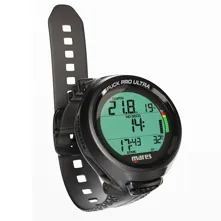
Mares Puck Pro Ultra Lite Dive Computer
SKU: MRSPPUCMFR: 414173BK
(10)- Mares Dive Computer: Easy-to-read, clear display.
- Long Battery Life: Up to 100 dives per battery.
- Nitrox Compatible: Supports 21% to 50% Nitrox mixes.
- Reliable Depth Data: Buhlmann ZH-L16C algorithm.
- User-Friendly Dive Computer: Intuitive interface.
- Bluetooth Dive Computer: Integrated Bluetooth feature.
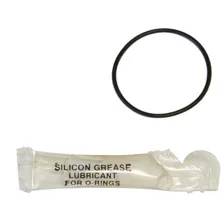
Oceanic Battery Kit for Atom/Geo Dive Computer
SKU: OCNBKAMFR: 04.6175.05
(7)- Essential Oceanic dive computer battery replacement kit.
- Ensures reliable power for your Oceanic Geo computer.
- Includes battery, O-ring, and silicone grease lubricant.
- Guarantees waterproof seal; use silicone grease provided.
- CR2430 lithium battery provides long-lasting performance.
- Easy-to-use kit with instructions for dive computer.
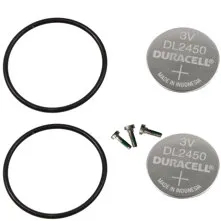
Suunto Zoop Novo & Vyper Novo Battery Replacement Kit
SKU: SQTBKZVNMFR: SS023242000
(14)- Suunto Dive Computer Battery Kit for Zoop Novo
- Ensures reliable power for your dive computer.
- Includes two CR2450 lithium batteries for gauges.
- Contains two O-rings for a secure, waterproof seal.
- Easy to use replacement kit with included screws.
- Compatible with Suunto Zoop/Vyper Novo computers.
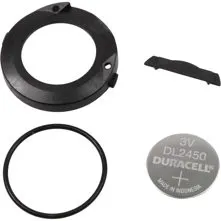
Suunto Zoop, Vyper & Cobra Battery Replacement Kit
SKU: SQTBKCMFR: SS023243000
(10)- Suunto Dive Computer Battery Kit: Reliable power.
- Zoop, Vyper & Cobra: Ensure dive computer accuracy.
- Includes CR2450 Lithium Battery for lasting dives.
- Easy to use battery replacement for dive computers.
- Dive Computer Accessories: Hatch & O-Ring included.
- Maintain water resistance with a new battery hatch.

Aqualung Battery Kit i200/i200C/i470TC
SKU: UDRBKI22CI4MFR: NS911398
- Ensure dive computer performance with new battery.
- Aqualung i200, i200C, i470TC dive computer compatibility.
- Maximize dive computer battery-life with this kit.
- Essential scuba gear: reliable replacement battery kit.
- User-friendly kit for Aqualung dive computer models.
- Durable battery ensures optimal computer performance.
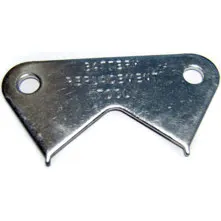
Oceanic Battery Replacement Tool
SKU: OCNBRTMFR: 04.6175.45
(4)- Essential tool for Oceanic computer battery change.
- Ensures proper battery hatch removal and install.
- Compatible with Veo 2 & Veo 4 dive computers.
- Also works with Oceanic Transmitters (OCNAT1T).
- Durable chromed steel build for reliable use.
- A must-have diving accessory for dive maintenance.
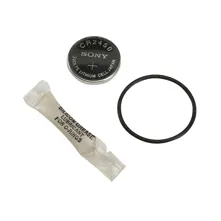
Sherwood Logic Battery Kit
SKU: SWDLBKMFR: CR825
- Sherwood CR825: Reliable dive computer battery kit.
- Includes CR2450 lithium battery for dive computers.
- Essential diving accessory: O-ring and lubricant included.
- Ensure dive computer functionality with this battery kit.
- Silicone grease provided for waterproof dive seal.
- Dependable power for Sherwood dive computers. Order now!
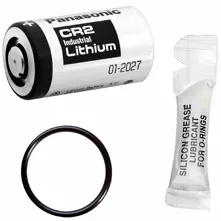
Aqualung Transmitter Battery Kit
SKU: UDRBKWTRMFR: NS911178
- Aqualung Transmitter Battery Kit: Reliable power.
- UDRT Dive Computer: Ensures seamless Nitrox compatibility.
- Includes Silicone Lubricant: Extends O-Ring life.
- CR2 Lithium-Ion Cell: Long-lasting 3.6 Volt battery.
- Dive Computer Transmitter Battery: Easy to replace.
- Aqualung Transmitter: Clear display, enhanced safety.
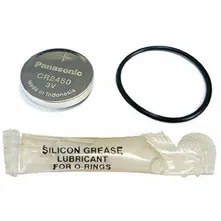
Aqualung Battery Kit i100/i300/i300C/i550
SKU: UDRBKI133C5MFR: 44700257
(1)- Aqualung Battery Kit ensures dive computer power.
- Compatible with i100, i300, i550 dive computers.
- Includes CR2450 lithium battery for performance.
- Silicone grease extends dive computer lifespan.
- Reliable power for Aqualung dive computers.
- Essential dive computer accessory for maintenance.